Pausing a medication
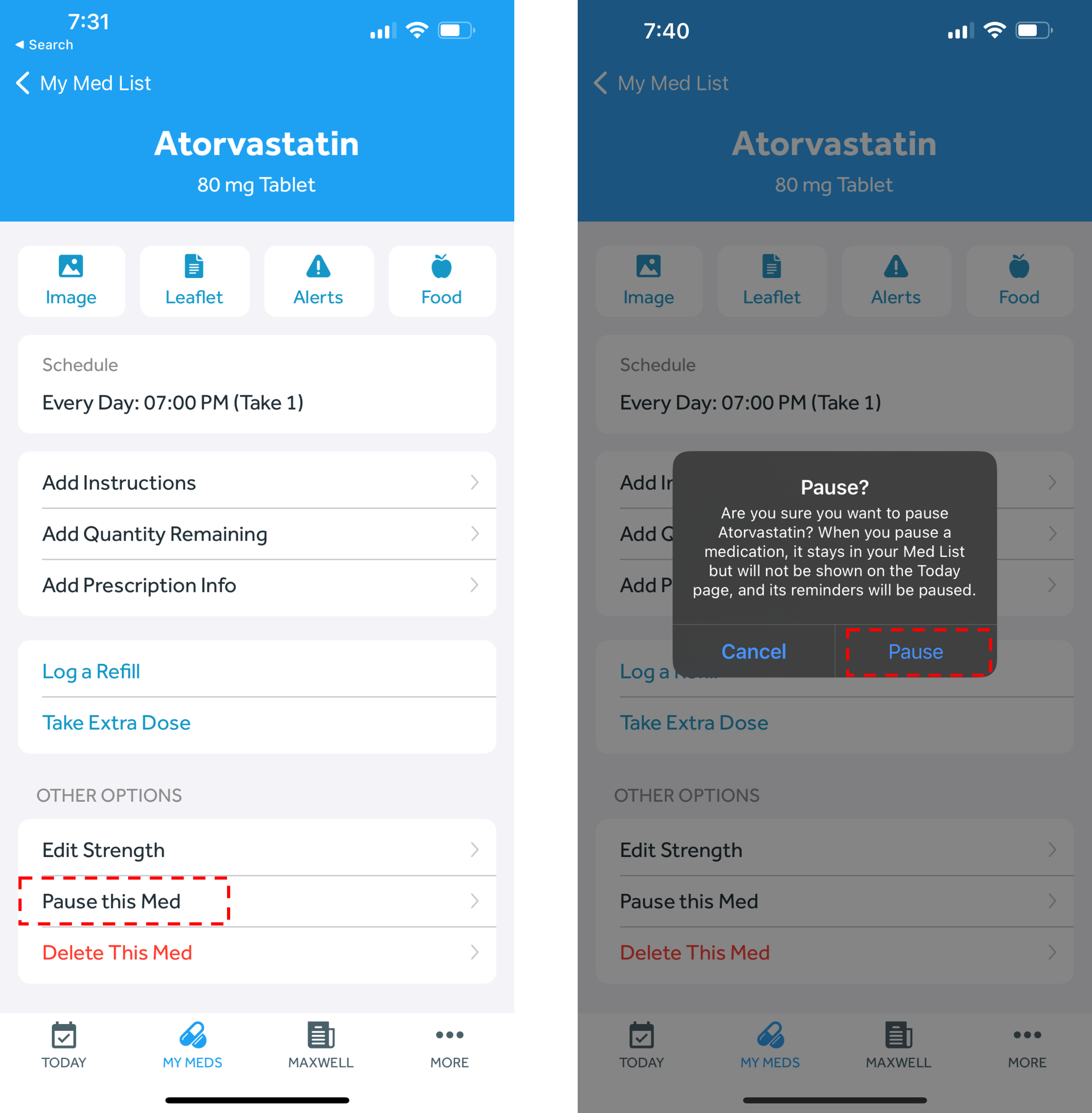
You can pause a medication in 2 different ways:
Option 1:
- In the Banner Medications app, navigate to the My Meds tab
- Select the medication you wish to pause
- Click “Pause this med” towards the bottom of the page
- Click “Pause” on the next pop-up
OR
Option 2:
- In the Banner Medications app, navigate to the My Meds tab
- Swipe to the left on the medication you wish to pause and click the gray “pause” button. Select “Pause” on the pop-up
Resuming a medication
You can resume a medication 2 different ways:
Option 1:
- In the Banner Medications app, navigate to the My Meds tab
- Click the paused medication that you’d like to resume
- Click the message at the top of the screen that reads “This medication is paused. Click to resume” and select “Resume” on the pop-up
OR
Option 2:
- In the Banner Medications app, navigate to the My Meds tab
- Swipe to the left on the medication you wish to resume and click the gray “play” button. Select “Resume” on the pop-up